How Wayfinding Pictograms Became Part of Public Sign Systems
Learn how wayfinding pictograms developed from local signs into coordinated systems, and how placement, standards, and context help visitors make sense of them.
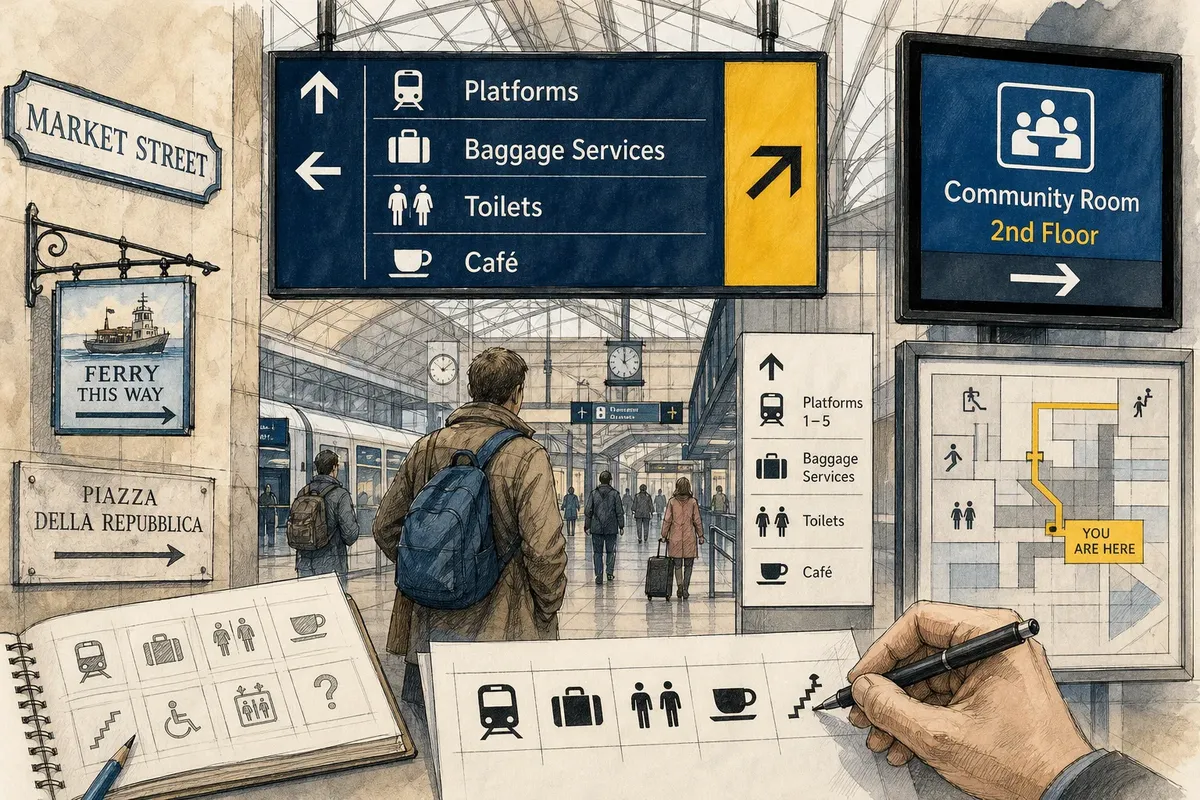
The common mistake in the history of wayfinding pictograms is to treat them as replacements for written directions. They grew alongside words, place names, and arrows, adding a visual layer to public signs. That shift mattered most when travelers needed to choose a route before they had time to stop and read.
Local signs linked words and places
Early public wayfinding relied on marks suited to a particular setting: a painted street name, a direction toward a market, or a sign pointing to a ferry landing. Such signs did not form one worldwide system. Their wording and materials reflected the people and places they served.
A written name could identify a specific destination more precisely than a general picture. But visitors might not know the local language, recognize an unfamiliar place-name, or have a clear view while moving. Visual marks offered another way to connect a sign with its surroundings.
There was no simple progression from words to pictures. Both remained useful, and their roles depended on the decision a traveler faced.
Organized transport called for signs that worked together
Railways, stations, and other organized transport settings brought people through unfamiliar buildings along shared routes. A traveler might need to locate an entrance, platform, or service without stopping in a crowded passage. In these settings, a sign had to do more than name a doorway: it had to help connect one decision to the next.
Repeated visual forms could help people recognize a type of facility in different parts of a station. Arrows and destination names still mattered, since a symbol alone might identify a service without showing where it was. The challenge was to make signs feel related while giving each one a distinct job.
Good placement made the system easier to use: put a cue where a person can act on it, not after the turn.
Public transport integrated pictograms into coordinated systems
As transport authorities organized sign programs, pictograms became elements in broader visual systems rather than stand-alone illustrations. Designers could create a family of symbols for services encountered repeatedly across a terminal or network. A luggage pictogram, for example, could identify a related service in different areas while keeping a recognizable shape.
A family of symbols needs both consistency and contrast. Shared visual features help signs belong together; clear differences help travelers distinguish one service from another. Designers also have to consider the sign’s setting. A detailed drawing may lose its defining shape when reproduced small or viewed from a distance.
Most importantly, a pictogram can identify a category but cannot necessarily explain a local rule, name a particular room, or give a complete route. Those details belong in words, arrows, and other signs nearby. That division of work is more useful than asking an image to do everything.
International events tested shared visual vocabularies
International events bring visitors who may not read the host language into unfamiliar venues. Organizers need signs for facilities and services that do not rely entirely on local wording. This encourages pictograms to function as a shared visual vocabulary, but it does not make every image self-explanatory.
A familiar-looking figure can suggest different activities to different visitors. The surroundings, a destination label, and the sign’s position can all help clarify its intended meaning. Organizers therefore need to consider who will use a sign and what decision it is meant to support.
For a visitor, the practical question is simple: does the symbol point to the place or service you need, or does it only suggest a general category?
Standards support recognition without erasing local context
Institutional conventions and formal standards can help pictograms remain recognizable across locations. A visitor may understand the general kind of facility shown in a new station because the symbol resembles one seen elsewhere. A local sign system can preserve that familiar form while adding a destination name, an arrow, or other details suited to the building.
Recognition is not the same as universal understanding. People interpret images through experience and context, and a symbol that seems obvious to one traveler may be unclear to another. Nearby cues—a service counter, corridor, arrow, or room name—can help settle the meaning.
When a sign seems ambiguous, compare it with the destination wording and the next sign along the route. If those cues conflict, ask staff rather than relying on the picture alone.
Digital signs make timing part of the message
Digital displays can update directions when a route changes or a service moves. A pictogram can remain stable while text names the current destination or explains a temporary condition. But a display that changes too quickly may leave a passerby with only part of the instruction.
Consider an invented situation: a community center screen shows a room pictogram, but the starting information gives no floor or direction. The center adds the floor name and an arrow pointing toward the correct corridor. The expected observable result is a display that identifies both the destination level and the direction to take; if the arrow conflicts with a nearby permanent sign, staff should resolve the discrepancy before visitors rely on either cue.
Use a permanent sign for information that must remain visible at a fixed doorway, and a digital display for information that genuinely changes.
What should visitors look for when a pictogram is unclear?
Can a pictogram work without a written label?
It can when the symbol is familiar and its setting makes the destination clear. If it could be mistaken for another service, look for a label or ask staff before choosing a route.
Why might a symbol differ between locations?
An institution may adapt a pictogram to fit its sign system or the space available. If the adapted version no longer resembles the familiar symbol, seek a written label or another nearby cue.
Do wayfinding pictograms mean the same thing everywhere?
No; people learn visual conventions through experience, and local context can change how an image reads. Check the destination name and surrounding signs when the symbol is unfamiliar.
What if the signs along a route disagree?
Stop at a safe place and compare the arrow, destination name, floor information, and next sign. If they point to different places, ask staff rather than choosing based on the pictogram alone.
Check the sign against the decision it supports
Wayfinding pictograms developed alongside written directions, not in their place. Their value comes from helping people recognize a service or destination within a larger sign system. A useful sign connects that cue to a real choice, with words, arrows, and placement supplying whatever the image leaves out.
Next time you see a public pictogram, ask what action it supports and whether it appears before the decision point. Wayfinding pictograms work best when the route’s following signs confirm the same destination; that continuity lets a traveler check an interpretation instead of simply hoping it is right.